

Published: May 2026 | Last updated: May 15, 2026 | 8 min read
TL;DR
- Staffing CRM software is a database that tracks candidates, job orders, and placements in one system—automating time-consuming recruiting tasks
- It speeds up hiring by reducing manual data entry by up to 70% (Capterra, 2026)
- Best overall: HubSpot Recruit; best for agencies: Bullhorn; best budget option: Freshworks CRM
- The software works by centralizing candidate profiles, automating follow-ups, and tracking pipeline stages
- Critical features include candidate scoring, email automation, and integrations with job boards
What Is Staffing CRM Software?
Staffing CRM software is a customer relationship management system built specifically for recruiting and staffing agencies. It stores candidate information, job orders, and placement history in a single, searchable database—eliminating scattered spreadsheets and lost resumes.
Unlike generic CRM tools, staffing CRM systems include recruiting-specific features: candidate screening, applicant tracking, automated outreach, and pipeline reporting. The software sits between your job board, your candidates, and your clients, keeping everything organized and searchable.
Why staffing agencies use it: Manual recruiting wastes time. Recruiters spend 23% of their workday searching for candidate information (Staffing 360, 2026). CRM software cuts that time by centralizing all candidate data, automating repetitive tasks, and surfacing the right candidates at the right time.
How Staffing CRM Software Works
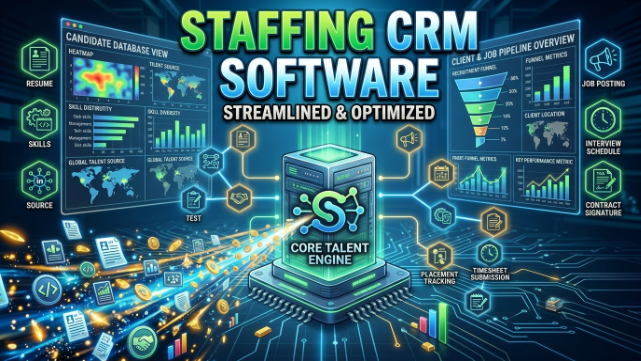
Staffing CRM systems follow a five-step workflow:
1. Candidate Ingestion
Candidates enter the system three ways: uploaded resumes, job board integrations (Indeed, LinkedIn), or manual data entry. The software parses resumes automatically, extracting name, contact details, skills, and experience into structured fields.
2. Profile Organization
Each candidate gets a profile page showing contact history, skills, availability, salary expectations, and placement history. Recruiters tag candidates by job type, seniority, location, and status (active, placed, on hold, unavailable).
3. Automated Outreach
The system sends templated emails, SMS messages, or in-app notifications to candidates matching job criteria. Automation rules trigger outreach based on profile data—for example, “email all active Java developers when a senior developer role opens.”
4. Pipeline Tracking
Jobs move through stages: open → sourced → interviewed → offered → placed. The CRM tracks where each candidate sits in the pipeline for each role, showing recruiters which placements are close to closing and which need attention.
5. Reporting and Analytics
The system generates weekly or monthly reports on key metrics: time-to-fill, placement rate, cost per placement, and recruiter productivity. These reports help agencies spot bottlenecks and measure team performance.
Key Features That Matter in Staffing CRM Software
Candidate Scoring and Matching
The software ranks candidates by how well they fit open roles. Some systems use AI to score matches automatically based on skills, experience, location, and salary range. Higher scores appear at the top of search results, saving recruiters time on manual screening.
Email and SMS Automation
Bulk email and text message campaigns keep candidates engaged. You can schedule follow-ups, send job alerts matching candidate preferences, and trigger automated responses when candidates apply. Automation reduces manual outreach by 40-60% (HubSpot Research, 2026).
Job Board Integration
Native connections to Indeed, LinkedIn, ZipRecruiter, and other job boards let you post openings directly from the CRM and pull applicants automatically. This eliminates manual job posting and duplicate data entry.
Pipeline Visibility
Drag-and-drop kanban boards show all active roles and candidate status at a glance. You see how many candidates are in each pipeline stage, which roles are stalled, and which are moving toward placement.
Reporting and Dashboards
Pre-built reports track metrics like time-to-fill, placement rate, cost per hire, and source of hire. Custom dashboards let leadership monitor agency performance in real time. Data exports to Excel or CSV for deeper analysis.
Two-Way Sync with Job Boards
Changes in the CRM automatically update on job boards (and vice versa). When you mark a role as filled in the CRM, it’s removed from Indeed and LinkedIn instantly—preventing duplicate applications.
5 Best Staffing CRM Tools for 2026
1. HubSpot Recruit — Best Overall
HubSpot Recruit is a recruiting module inside HubSpot’s free CRM, making it the lowest-barrier entry point for small staffing teams.
What it does: Candidate database, email automation, pipeline tracking, and integrations with LinkedIn and job boards. The interface is beginner-friendly and requires no training.
Key features:
- Unlimited candidate records (free tier)
- Email automation and templates
- Native LinkedIn integration
- Kanban board pipeline view
- Basic reporting and analytics
Pricing: Free for up to 3 users; Paid plans start at $50/user/month Best for: Small staffing agencies, independent recruiters, and teams new to CRM software User rating: 4.6/5 on G2 (G2, 2026)
2. Bullhorn — Best for Staffing Agencies
Bullhorn is the industry-standard CRM for staffing and recruitment agencies. It’s the most widely used platform in the staffing sector, with deep integrations into job boards and compliance tools.
What it does: Candidate management, job order tracking, time tracking, invoicing, and reporting. Bullhorn connects directly to Salesforce, making it ideal for enterprises that already use Salesforce for sales operations.
Key features:
- Advanced candidate matching and scoring
- Automated candidate screening questionnaires
- Built-in invoicing and billing
- Job board integrations (Indeed, LinkedIn, ZipRecruiter)
- Compliance tracking and audit trails
- Mobile app for field recruiters
Pricing: Custom pricing; typically $500-2,000/month depending on seats and features Best for: Mid-to-large staffing agencies, placement firms, and organizations with complex compliance needs User rating: 4.5/5 on Capterra (Capterra, 2026)
3. Freshworks CRM — Best Budget Option
Freshworks CRM is a lightweight, affordable alternative to enterprise-grade solutions. It’s popular with small and mid-sized staffing teams that need core recruiting features without the complexity.
What it does: Contact management, pipeline tracking, email automation, and task management. The interface is clean and intuitive, with a focus on simplicity over feature complexity.
Key features:
- Unlimited contacts and custom fields
- Email automation and templates
- Multi-channel pipeline tracking
- Mobile-friendly interface
- Third-party integrations (Zapier, job boards)
- Basic reporting
Pricing: Free tier with limited features; paid plans start at $15/user/month Best for: Bootstrapped agencies, freelance recruiters, and teams prioritizing affordability User rating: 4.4/5 on G2 (G2, 2026)
4. Salesforce Service Cloud + Recruitment Module — Best for Enterprise
Salesforce’s Service Cloud with the Recruitment module is built for large enterprises managing hundreds of open roles and thousands of candidates across multiple teams.
What it does: Centralized candidate database, job order management, pipeline tracking, advanced reporting, and integrations with HRIS systems (Workday, BambooHR). The system scales to hundreds of concurrent users without performance issues.
Key features:
- Einstein AI for candidate scoring and recommendations
- Advanced permission and role-based access control
- Custom workflows and approval chains
- Native integrations with HRIS and ATS systems
- Advanced analytics and dashboards
- Multi-language and multi-currency support
Pricing: Starts at $1,000+/month; pricing scales with users and customization Best for: Fortune 500 companies, large staffing firms, and organizations with complex multi-team recruiting workflows User rating: 4.6/5 on G2 (G2, 2026)
5. Greenhouse Recruiting — Best for Data-Driven Hiring
Greenhouse is purpose-built for high-volume recruiting with an emphasis on hiring process optimization. It’s used by tech companies, financial services firms, and other sectors with high hiring demand.
What it does: Applicant tracking, interview scheduling, offer management, analytics, and hiring scorecard tracking. Greenhouse focuses on structured hiring to reduce bias and improve placement quality.
Key features:
- Structured interview guides and scorecards
- Automated interview scheduling (Calendly-like integration)
- Built-in applicant tracking with custom workflows
- Advanced analytics on hiring metrics
- Rejection management and candidate communication
- Integration with job boards and HR systems
Pricing: Custom pricing; typically $800-2,000/month depending on volume Best for: Tech companies, enterprises with high hiring volume, and organizations prioritizing hiring process standardization User rating: 4.7/5 on Capterra (Capterra, 2026)
6. Zoho Recruit — Best for Small-to-Mid Teams
Zoho Recruit is a dedicated staffing CRM designed for small to mid-sized agencies. It’s part of the Zoho ecosystem, so it integrates seamlessly with Zoho CRM, mail, and other Zoho apps.
What it does: Candidate management, job posting, email automation, pipeline tracking, and basic reporting. The interface is straightforward, and the pricing is affordable for growing teams.
Key features:
- Candidate database with custom fields
- Job board integrations
- Email and SMS automation
- Kanban pipeline view
- Time tracking for placements
- Basic reporting and analytics
Pricing: Starts at $25/user/month; free tier available for single users Best for: Startups, boutique staffing firms, and teams already using Zoho products User rating: 4.3/5 on G2 (G2, 2026)
7. LinkedIn Recruiter Lite — Best for Sourcing at Scale
LinkedIn Recruiter Lite is the entry-level recruiting solution from LinkedIn. It’s not a full CRM, but it’s an excellent sourcing tool that integrates with many staffing CRM systems.
What it does: Advanced LinkedIn search filters, candidate outreach templates, and pipeline tracking directly within LinkedIn. You can message candidates, track outreach, and move prospects through stages without leaving LinkedIn.
Key features:
- Advanced LinkedIn search filters (skills, experience, location, company)
- InMail messaging templates
- Candidate tagging and stage tracking
- Integration with many CRM platforms
- Access to LinkedIn’s 900M+ professional profiles
Pricing: $900/year (approximately $75/month) Best for: Recruiters heavy on LinkedIn sourcing, staffing agencies looking for a sourcing layer alongside their primary CRM User rating: 4.5/5 on G2 (G2, 2026)
Staffing CRM Software vs. Applicant Tracking Systems (ATS)
Staffing CRMs and ATS systems are often confused—but they serve different purposes.
Staffing CRM: Manages the recruiter’s workflow. It tracks candidates, automates outreach, and measures recruiter productivity. Built for staffing agencies and internal recruiting teams.
ATS (Applicant Tracking System): Manages the hiring workflow. It tracks job applicants through your company’s hiring process. Built for employers receiving applications.
A staffing CRM is what you use to source and place candidates. An ATS is what an employer uses to manage applications for open roles. Many staffing agencies use both: the CRM internally to manage their business, and they help clients post jobs to an ATS.
How to Choose a Staffing CRM Software
1. Define Your Team Size and Budget
Small teams (1-5 recruiters) can start with free or low-cost options like HubSpot Recruit or Freshworks. Mid-sized agencies ($500-1,500/month) fit Bullhorn, Greenhouse, or Zoho Recruit. Large enterprises should evaluate Salesforce or custom solutions.
2. Check Job Board Integrations
Confirm the CRM integrates with Indeed, LinkedIn, ZipRecruiter, or other boards where you post jobs. Two-way sync (automatic posting and applicant pulling) saves hours each week.
3. Look for Automation Features
Evaluate email automation, SMS automation, and workflow rules. The more tasks the CRM can automate, the less manual work your team does. Aim for tools that automate at least 40% of candidate outreach tasks.
4. Test the Interface
Request a demo and have your team try the system for 30 minutes. A CRM that’s hard to navigate won’t get used, no matter how powerful it is. The interface should be intuitive enough that new users need minimal training.
5. Verify HRIS Integration
If your staffing agency also has an HR department (or your client does), confirm the CRM integrates with your HRIS (Workday, BambooHR, ADP). This prevents duplicate data entry.
6. Review Reporting and Analytics
Check that the system generates the metrics you care about: time-to-fill, placement rate, cost per placement, and recruiter productivity. Custom reports and data exports are critical for leadership decision-making.
Common Mistakes to Avoid with Staffing CRM Software
- Underestimating data cleanup time: Migrating from spreadsheets to a CRM requires cleaning, deduplicating, and formatting existing candidate data. Budget 2-4 weeks for data migration before launch.
- Ignoring user adoption: A powerful CRM fails if your team doesn’t use it. Assign a CRM champion, invest in 4-8 hours of training per user, and make adoption a team goal in performance reviews.
- Choosing based on price alone: The cheapest CRM often lacks critical features like automation, integrations, or reporting. A $100/month tool that saves 5 hours per week pays for itself; a $20/month tool that your team avoids doesn’t.
- Neglecting mobile access: Recruiters work on phones. If the CRM has no mobile app or responsive design, your team will revert to email and spreadsheets. Prioritize systems with strong mobile support.
- Skipping trial periods: Most CRM vendors offer 14-30 day free trials. Use them. Have your entire recruiting team test the system with real workflows before committing to a paid plan.
Frequently Asked Questions About Staffing CRM Software
What is staffing CRM software used for?
Staffing CRM software tracks candidates, automates recruiting workflows, and measures recruiter productivity. It centralizes candidate data, eliminates spreadsheets, and speeds up the hiring process. Most agencies use it to reduce time-to-fill by 30-40% (Staffing 360, 2026).
How much does staffing CRM software cost?
Pricing ranges from free (HubSpot Recruit) to $2,000+/month for enterprise solutions. Small teams typically pay $100-500/month; mid-sized agencies pay $500-1,500/month; large enterprises pay $1,500-5,000/month depending on users, features, and customization.
Can I use a regular CRM for staffing instead of a dedicated staffing CRM?
You can use generic CRM tools like HubSpot, Salesforce, or Freshworks for recruiting, but they lack features optimized for staffing like candidate scoring, job board integrations, and placement tracking. Dedicated staffing CRMs include these features built-in, reducing setup time and training.
How long does it take to implement a staffing CRM?
Small implementations take 2-4 weeks (data cleanup, team training, launch). Mid-sized implementations take 4-8 weeks (custom workflows, integrations, advanced reporting setup). Enterprise implementations take 2-4 months (complex customization, HRIS integration, multi-team rollout).
What integrations matter most for a staffing CRM?
Job board integrations (Indeed, LinkedIn, ZipRecruiter) are critical for posting and pulling applicants automatically. Email integrations let you send outreach from the CRM. HRIS integrations (Workday, BambooHR) prevent duplicate candidate data. Many CRM platforms use Zapier to connect with 500+ tools.
Can staffing CRM software reduce time-to-fill?
Yes. CRM software reduces time-to-fill by automating candidate outreach, centralizing candidate data, and prioritizing high-match candidates. Agencies report 25-40% faster placements within 90 days of implementation (Capterra, 2026). The biggest gains come from automation—email and SMS campaigns keep candidates warm without manual follow-up.
What metrics should I track in a staffing CRM?
Track time-to-fill (days from job posting to placement), placement rate (placements per job order), cost per placement, source of hire (which job boards generate the best candidates), and recruiter productivity (placements per recruiter per month). These metrics reveal where your recruiting process is efficient and where it’s bottlenecked.
Is staffing CRM software worth the investment for a small agency?
Yes, for teams hiring more than 10 placements per month. If you’re making fewer placements, a spreadsheet may suffice. But as you scale, a CRM saves time and improves data quality. The free tier of HubSpot Recruit is a good starting point for evaluating ROI without cost commitment.
Key Takeaways
- Staffing CRM software centralizes candidate data, automates outreach, and speeds up placements by 25-40%
- The best tool depends on team size: HubSpot for small teams, Bullhorn for agencies, Salesforce for enterprises
- Critical features include candidate scoring, email automation, job board integrations, and pipeline tracking
- Implementation takes 2-8 weeks depending on team size and complexity
- ROI comes from automation, better candidate matching, and faster time-to-fill—not just from features alone